How drag‑and‑drop modules, component design, and integrated CRM unlock a smoother editor experience and a better product for users
UX framing: drag‑and‑drop modules as product design, not page decoration
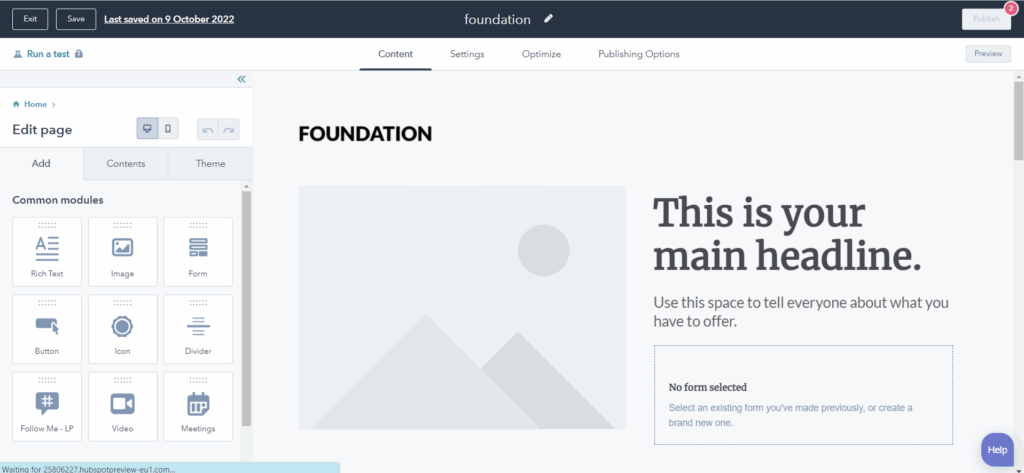
Drag‑and‑drop should not mean ad‑hoc layout tinkering. It is most valuable when built on a component design systemwith clear rules.
What good looks like
- Reusable modules with clear inputs and guardrails. Content editors fill structured fields rather than free‑form HTML.
- Tokens and variants for spacing, typography, and color so pages look consistent without manual nudging.
- Accessibility baked in to each module (semantic headings, ARIA where needed, keyboard focus, color contrast).
- Performance by default with lazy‑loading media and optimized image sizes.
Why editors love it
- Faster page creation with fewer tickets to dev.
- Lower cognitive load because choices are constrained to brand‑safe options.
- Predictable outcomes. A hero module always behaves the same way across the site.
Why users love it
- Consistent patterns improve learnability and reduce friction.
- Better performance and accessibility improve task completion and SEO.

HubSpot vs WordPress at a glance
| Dimension | HubSpot CMS | WordPress |
|---|---|---|
| Core concept | All‑in‑one CMS + CRM + marketing automation. Modules and themes are tightly integrated with CRM objects and smart content. | Open‑source CMS with a vast plugin ecosystem. You assemble capabilities via themes, builders, and plugins. |
| Drag‑and‑drop | Native flexible sections and modules with field‑level controls. Strong content modeling via HubDB and custom objects. | Multiple builders available. Quality varies by vendor. Can achieve excellent UX with a solid design system, but consistency relies on governance. |
| Personalization | Built‑in smart content rules using CRM lists, lifecycle stage, device, location. | Possible via plugins and custom code. More setup and ongoing maintenance. |
| Forms + CRM | First‑class integration. Submissions become contacts with timelines and workflows. | Forms can connect to CRMs via plugins or APIs. More moving parts to keep aligned. |
| A/B testing | Native A/B for pages, CTAs, email with unified reporting. | Available through plugins or external tools. Integration and data trust vary. |
| SEO + analytics | Built‑in SEO recommendations and integrated analytics tied to contacts. | Powerful via plugins and GA. Requires configuring and maintaining multiple tools. |
| Security & hosting | Managed, secure, CDN out of the box. No server patching. | You control hosting. Flexibility to optimize but responsible for updates, backups, hardening. |
| Governance | Roles, approvals, content staging and partitioning built in. | Possible with roles and plugins. Can be excellent with the right stack and discipline. |
| Cost model | Licensing for CMS Hub tiers. Fewer hidden costs, but vendor lock‑in. | Software is free. Costs accrue via premium themes, plugins, hosting, performance work, and ongoing maintenance. |
| Extensibility | Serverless functions, APIs, HubDB, custom objects, app marketplace. | Virtually unlimited via PHP, headless, REST/GraphQL, and massive plugin ecosystem. |
Bottom line: If your marketing and sales rely on the CRM and you want guardrails, HubSpot reduces complexity. If you need deep customization, unique workflows, or you already operate a mature DevOps pipeline, WordPress remains a powerhouse.
Positives and negatives
HubSpot strengths
- Integrated CRM, automation, and content tools reduce context switching and data drift.
- Component‑driven page building aligns naturally with design systems and UX governance.
- Native A/B, SEO, and analytics accelerate evidence‑based iteration.
- Managed hosting, CDN, and security reduce operational overhead.
HubSpot trade‑offs
- Licensing. You pay for the all‑in‑one convenience.
- Proprietary environment and vendor lock‑in. Migrations require planning.
- Development constraints compared with a fully custom WordPress stack.
WordPress strengths
- Maximum flexibility. Anything is possible with the right engineering approach.
- Massive ecosystem and community.
- Cost control at the software level and full ownership of code and hosting.
WordPress trade‑offs
- Plugin sprawl and version drift can introduce reliability and security risks.
- Performance and accessibility depend on strict governance and disciplined theme/builder choices.
- Integrations with CRM and automation are powerful but require more care and monitoring.
My migration approach (UX first, tech aligned)
- Goals and success metrics
- Define business outcomes and user tasks. Pick 3–5 KPIs to improve post‑launch.
- Content and structure audit
- Inventory pages, templates, components, media, forms, and SEO metadata. Map what to keep, merge, retire.
- Design system and module map
- Translate common page patterns into a modular library. Define fields, validation, responsive rules, and accessibility.
- Data model and integrations
- Align contact properties, lists, and lifecycle with forms and workflows. Plan redirects and URL structure.
- Build and validate
- Create themes, modules, and templates. QA for performance, accessibility, and editorial ergonomics.
- Content migration
- Lift structured content, re‑author where needed to fit modules, and import media with correct alt text and file naming.
- Training and governance
- Editor training on module usage, content guidelines, and publishing flow. Define roles and approvals.
- Launch and iterate
- Ship behind analytics checkpoints and A/B tests. Review KPIs against the baseline after 30 and 90 days.
How drag‑and‑drop improves UX in practice
- Consistency: Modules enforce structure and accessible patterns so users never have to relearn components page to page.
- Speed: Editors assemble pages quickly, which shortens feedback loops and enables more testing.
- Reduced errors: Field validation prevents broken layouts and contrast failures.
- Evidence‑based design: A/B testing on modules and CTAs links design choices to outcomes.
Where WordPress may still be the better choice
- Highly bespoke experiences that need custom application logic or a headless architecture.
- Complex editorial workflows beyond HubSpot’s model or unique content types not warranted in HubDB or custom objects.
- Teams with strong in‑house DevOps wanting full control over stack and cost structure.
If you are weighing a move from WordPress to HubSpot and want a UX‑first plan that delivers measurable impact, let’s talk. I can audit your current site, blueprint your module library, and pilot a high-value page in HubSpot so you can see the difference.




0 Comments